13 Mart 2019 Çarşamba

Lock all fields on a form using Javascript- Microsoft Dynamics CRM

Hi,

The below code takes the control of the form directly rather then of each field and locks all of them.

 function disableFormFields()

{
      Xrm.Page.ui.controls.forEach(function (control, index) {
           var controlType = control.getControlType();
           if (controlType != “iframe” && controlType != “webresource” && controlType != “subgrid”)

           {
               control.setDisabled(true);
           }
       });
}

10 Ocak 2017 Salı

Dynamics 365 – Editable Grids JavaScript Example

You can reach the article at this link.


To update the MS CRM 2016 to Dynamics 365

You can download the December 2016 Update for Dynamics 365  at below link.
https://www.microsoft.com/en-us/download/details.aspx?id=54515

21 Haziran 2016 Salı

CRM-Performance-Toolkit

The Microsoft Dynamics CRM 2015 Performance Toolkit was created by the Microsoft CRM product team to formalize performance testing of Microsoft CRM 2013 and later releases. The performance toolkit can be used by the Microsoft CRM partners and customers to collect data to support their CRM deployment decisions.

 download link: https://github.com/Microsoft/CRM-Performance-Toolkit

22 Mayıs 2016 Pazar

Microsoft CRM Record Recovery

Record Recovery gives a system user the ability to recover deleted CRM records. Providing that auditing is enabled this tool can utilise auditing data to recover deleted records. Record Recovery has been produced using the Microsoft Silverlight 4 framework and integrates seamlessly into Microsoft Dynamics CRM 2011. Record Recovery is one tool that CRM developers and consultants alike should have in their arsenal.
This tool should not neglect the importance of database backups and data restoration. However, if you require restoring a handful of accidently deleted records, and you have audit records of the deletion, then this is the tool for you.
You can download from the link

MSCRM ToolKit is a collection of useful tools for people working on Microsoft Dynamics CRM 2011,2013 and 2015 projects

You can download in this link

18 Mayıs 2014 Pazar

22 Temmuz 2013 Pazartesi

Dynamics CRM 2013 – Mobil Versiyonu Ekran Görüntüleri

mobile1

mobile2

mobile4

mobile5

mobile6

mobile7

mobile8

mobile9

mobile10

mobile11

mobile12

mobile13

mobile14

mobile15

mobile16

mobile17

mobile18

mobile19

mobile20
sc11_ipad

Update Rollup 14 for Microsoft Dynamics CRM 2011 is available

Issues that are resolved in Update Rollup 14 for Microsoft Dynamics CRM 2011:

  • Better performance around User and Team caching. For example, a user is a member of 15,000 teams. You login as this user and it takes a long time to cache all the data. If you login as another user, you see the same problem due to clearing the cache.
  • "Show Selected Views" does not work in CRM Dashboard.
  • Description field in activity views shows HTML style information.
  • Description field and notes are not displayed correctly during Print Preview after Update Rollup 12.
  • When you perform a Quick Find search in Outlook, the columns shown in the view are the intersection of the columns from the previous view that was shown in Outlook and the Quick Find view definition. This differs from what you see when you do a search in the web client. After the search is run, no columns are displayed because the specific column is not included in the Quick Find view.
  • WRPC token is missing when you use SharePoint Integration.
  • Adding a mail template in CRM after Update Rollup 12 causes errors.
  • Rich Text Editor errors occur when you paste content during creation of mail merge templates in CRM 2011 online.
  • My Team Members' Activities view displays incorrect results through CRM for Outlook client.
  • AddressBookMaterializedViewsEnabled triggers a crash if entity does not have an email address.
  • Outlook folders are filtered only per the user’s security, and does not take into account the security of the team the user is a part of.
  • SQL CE connections in 32-bit versions of the Microsoft Dynamics CRM 2011 Client for Outlook are not being released.
  • Memory errors in 32-bit CRM for Outlook when you go offline.
  • Templates are applied to distributed campaign email messages despite being deselected.
  • Formatting exceptions occur during data import.
  • Microsoft Dynamics CRM Reporting Extensions Data connector platform traces are not written when SSRS is on a separate computer from CRM.
  • Double quotation marks are changed to single quotation marks in KB articles.
  • When OverrideTrackInCrmBehaviour is enabled, you can't untrack email in CRM Outlook Client.
  • "Show only my records" in lookup dialog box doesn't always show just my records.
  • When you click View existing record in CRM in the Outlook client, nothing happens.
  • Errors occur when you send direct email in CRM outlook client while you're offline.
  • Sum of currency type field displays an incorrect currency symbol.
  • Outlook Quick Find displays Filter Criteria incorrectly after Update Rollup 12 is installed.
  • User can publish articles without the Publish article permission.
  • Email router stops processing email messages after it encounters a message that does not have a From field value.
  • Printer prompts for 8.3" x 11" paper when you print a report that was created in the report wizard.
  • Deleting entity triggers System.Array.Copy throws ArrayTypeMismatchException.
  • Base64 attributes are returned as MemoAttributeMetadata instead of as StringAttributeMetadata.
  • Excel sheet name isn't shown correctly on Update Rollup 12 when Advanced Find results are exported to Excel.
  • Microsoft CRM ribbon disappears in Outlook 2007 clients.
  • Process with condition on email recipient fails if recipient is unresolved.
  • Tasks tab is blank in the Synchronizing dialog box when you go offline.
  • Updating individual occurrences of a Recurrence Meeting breaks recurrence.
  • Outlook client crashes when you try to add email activity to order from outlook client.
  • "Error in LoadSiteWideSettings" error when you start Deployment Manager. 

Prerequisites

You must have Microsoft Dynamics CRM 2011 Update Rollup 6 (build 5.0.9690.1992) or a later version of Microsoft Dynamics CRM 2011 installed to apply this update rollup. For more information about Update Rollup 6, click the following article number to view the article in the Microsoft Knowledge Base:
2600640 Update Rollup 6 for Microsoft Dynamics CRM 2011 is available
For information about compatibility, click the following article number to view the article in the Microsoft Knowledge Base: 
2669091 Microsoft Dynamics CRM Compatibility List


For download Rollup 14 click the link

Dynamics CRM 2013 Ekran Görüntüleri

sc1
sc2
sc3
sc4
sc6
sc8

24 Şubat 2013 Pazar

CRM Diagnostics Onpremise for MS CRM 2011

CRM Diagnostics Onpremise for MS CRM 2011:   http://localhost/tools/diagnostic/diag.aspx


31 Aralık 2012 Pazartesi

CRM 2011 Navigation UI Record Counter


Form üzerinde ilişkili kayıtları göstermek için güzel bir uygulama. Bu uygulamayı Codeplex'den indirebilirsiniz.

3 Kasım 2012 Cumartesi

Microsoft Dynamics CRM 2011 Instance Adapter


Microsoft Dynamics CRM 2011 Instance Adapter provide MS CRM 2011 for synchronizing to data between two Microsoft Dynamics CRM 2011 organizations. To know more information on the Instance Adapter, Click Here


1 Kasım 2012 Perşembe

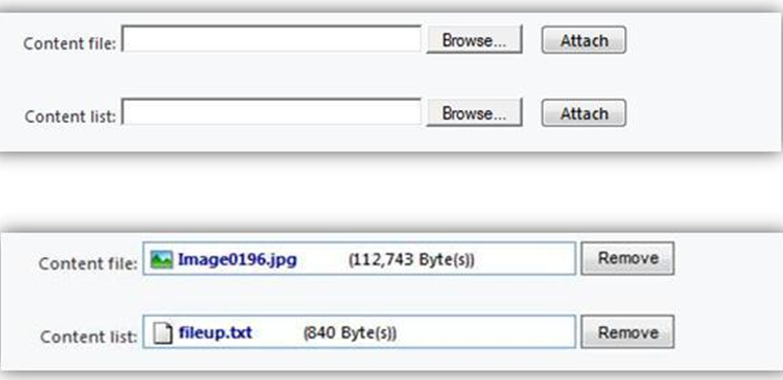
File upload control for MS CRM 2011


This application provide MS CRM 2011 for adding a custom control for File Uploading purpose inside the forms, by using the features of MS CRM itself.. The tool is available on CodePlex


19 Ekim 2012 Cuma

Iconator for Microsoft Dynamics CRM


This application eases the customization of custom entities icons in Microsoft Dynamics CRM 2011. It has been developed by Lloyd Sebag and Tanguy Touzard and is provided for free. The tool is available on CodePlex


Tool

3 Ekim 2012 Çarşamba

CRM 2011 Lookup Preview


This tools provide to  detail information about Lookup record, user can see more detail information, click it and open Lookup details form. Although this serves the purpose, it’s still an extra click that user have to make to see the details of Lookup field. For more information and download, visit the following Codeplex site
Demo_Screen_1

Metadata Document Generator for Microsoft Dynamics CRM 2011


Metadata Document Generator for Microsoft Dynamics CRM 2011 is a great tool for documentation of MS CRM 2011. For more information and download,visit the following Codeplex site
Features
  • Wizard style application
  • Connect to all type of Dynamics CRM 2011 deployments
  • Select entities to include in workbook/document
  • Possibility to select which attributes to include in documentation
  • Select language output for entity/attribute display name if multiple language pack are installed
  • Generate MS Excel workbook or MS Word document
 Screenshots
Application
image
image
image
image
image
image
image 
Generated Excel workbook
image
Generated Word document
image

10 Eylül 2012 Pazartesi

CRM 2011 Timeouts and Limits


There are few limitations of CRM 4.0 and Microsoft CRM 2011 like  Excel Export, Data Import, Sub-Grid’s On The Form, Query Result Set Limit and etc. To resolve these problems visit the following site.